
FH Web
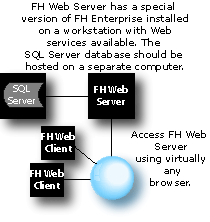
FH Web is a web-enabled version of FH that allows you to access FH from any workstation or tablet device with Internet access.
System Requirements
The FH Web Server must meet the following requirements:
NOTE: When you optionally configure load balancing, the FH Web Relay Server simply routes new FH Web sessions to available FH Web Dependant Application Servers. The FH Web Relay Server does not need to have the fastest processor or the most available resources. The emphasis on processor speed and resources in a load balanced configuration should be directed toward the FH Web Dependant Application Server(s).
Web Server Requirements:
- Windows Server 2003 or 2008 Standard or Enterprise Edition.
- Required memory:
- Minimum 512 MB of RAM plus 10 MB of RAM per FH Web Client.
- 2GB of free disk space on C:\. We recommend 80 GB or more.
- TCP/IP network connections (TCP/IP must be installed prior to FH Web Server installation).
- FH Web server must have web services installed and active. Microsoft IIS 6.0 or later is required.
- Color depth greater than 256 colors, 16 million colors recommended.
- Unique Windows logons for each workstation accessing FH Web.
FH Web Client workstation requirements vary depending on whether the Java, ActiveX, or Native Windows client is used. The ActiveX and Native Windows clients can be used on most Windows computers, including computers running 64-bit operating systems. The Java client can be run on any workstation with a java-compatible Internet explorer, even non-Windows workstations.
- Clients running the Java Client should set their color palettes to anything less than True Color.
- TCP/IP must be installed as a network protocol.
SQL Server Requirements

Connect remotely via your tablet with FH iWeb
Take your pick….either iPad iOS or the Google Android 3.0 operating system. Both tablet options can connect you to your FH Web system remotely using FH iWeb. Download the free app for your device from the appropriate store. (The app requires version 4.0.1.10784 or higher of the FH WEB server.)
Request an Evaluation
We have FH Web installed for your evaluation. To access the evaluation of FH Web, contact our sales team.
When you access the FH Web evaluation, you are accessing and running FH on the server much as you will do should you purchase and install FH Web for your department.
 Keep In Touch

