Synchronize data from the command line
You can also synchronize your mobile computer and the FH database using Windows command prompts and command line parameters.
-
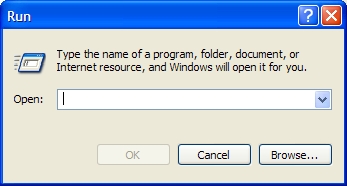
Choose Start → Run.
The Run dialog box appears.
-
In Open, type InstallDirectory
/FHMOBILE_SYNC.EXE.Example:
"C:\Program Files\FIREHOUSE Software Mobile\FHMobile_Sync.exe"Caution: Do not click OK yet in the dialog box.
-
Add one or more of the following synchronization parameters to what you have already typed in Open.
All FH Mobile applications
Use this
parameterTo do this
/QQuiet synchronization with no prompts displayed before or after the synchronization process.
/LookupDownload lookup tables and supporting information.
/StreetDownload street names.
/DelStreetDelete downloaded street names.
FH ePCR
Use this
parameterTo do this
/EMSDownload EMS information.
/EMSPushUpload EMS incident and patient records.
/EMSFFFrequently transported patients.
FH Mobile Incident Command
Use this
parameterTo do this
/ICMPushUpload and create NFIRS incident reports from incident command records. /PreplanDownload occupancies and preplan information. FH Mobile Inspections & Occupancies
Use this
parameterTo do this
/INSDownload inspection information. /INSSIGNDownload previously signed inspection signatures. /INSIMPORTDownload inspection information from FH export. /INSPushUpload inspection information. /GENGenerate review list (conflicts will always be written). Example:
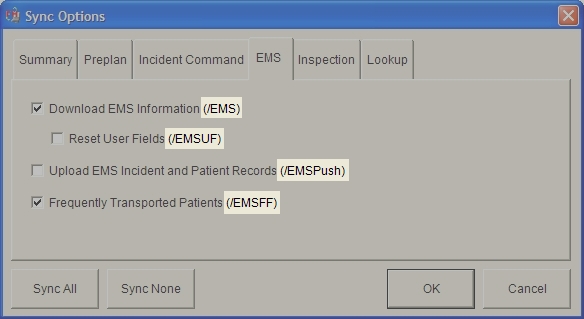
"C:\Program Files\FIREHOUSE Software Mobile\FHMobile_Sync.exe" /INS /QTip: Command line parameters for synchronization options appear in parentheses at the end of checkbox labels in the Sync Options dialog box.
The Sync Options dialog box appears, set to the Summary tab.
-
Click OK.
The synchronization runs according to the parameters specified in the Run dialog box.
Tip: You can automate command line synchronizations with an automated scheduling application, to ensure that synchronizations occur without user intervention. If you do this, be sure to review the synchronization log to verify that the synchronization occurred as expected.