Register FH Medic on the iPad
-
On your iPad's desktop, touch the FH Medic iPad icon.

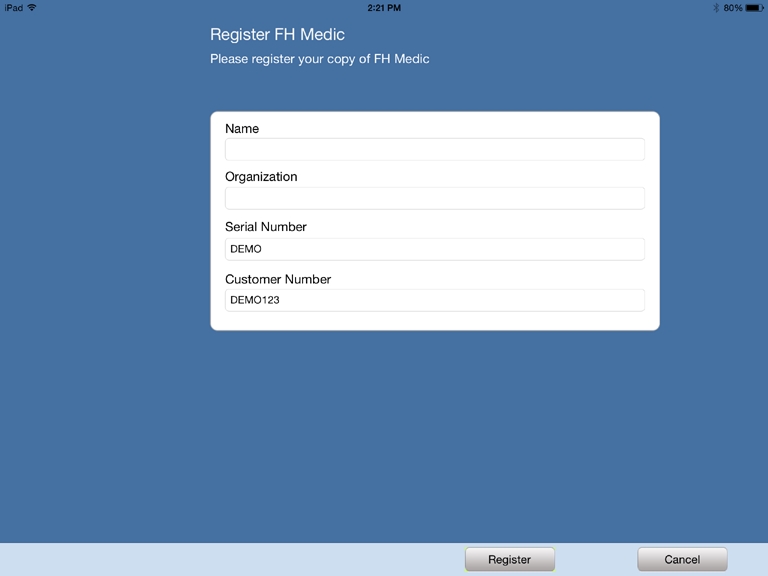
The FH Medic registration dialog box appears.
- In Name and Organization, type the requested information about your fire department.
-
Depending on whether you are registering FH Medic on the iPad as a demonstration copy or as a purchased copy, do one of the following.
 Demonstration copy
- In Serial Number, verify that
DEMOis displayed. - In Customer Number, verify that
DEMO123is displayed. -
In the lower right corner of the screen, touch Register.
Your installation of FH Medic is registered as a demonstration copy with FIREHOUSE Software, and is valid for 45 days.
If you decide to purchase FH Medic, when the purchase is complete, you will be sent an email containing new serial number and customer number information, and you will need to re-license FH Medic with it.
Purchased copy
Note:
- When you purchase FH Medic for the iPad, you are sent an email message containing a serial number and a customer number for FH Medic. You will need access to the contents of that email when licensing FH Medic.
-
If you had already installed a demonstration copy of FH Medic, you need to uninstall it, and then re-install FH Medic and re-license it with the steps below.
- In Serial Number and Customer Number, type the serial number and customer number in the email you received when you purchased FH Medic.
-
In the lower right corner of the screen, touch Register.
Your installation of FH Medic is registered with FIREHOUSE Software.
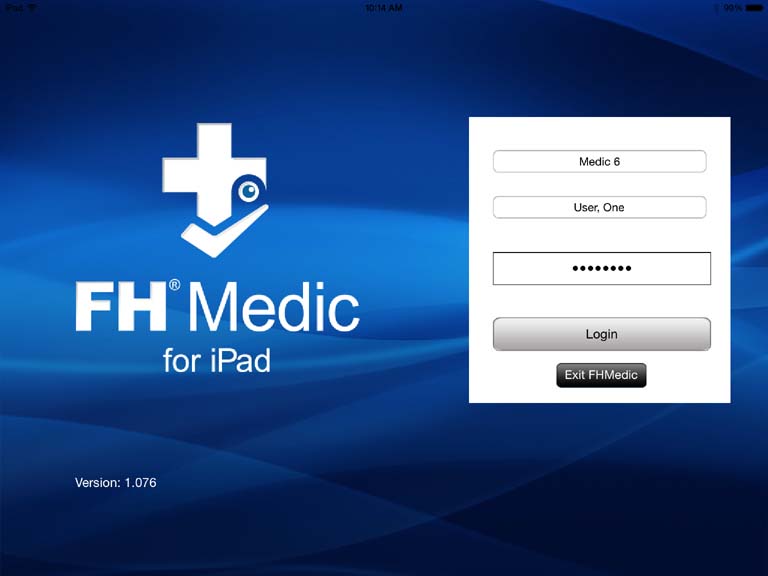
The FH Medic for iPad login screen appears.
- In Serial Number, verify that
- Continue with Log into FH Medic on the iPad.