Edit an existing service
-
Choose Start → Programs → FIREHOUSE Software CAD Monitor → FIREHOUSE Software CAD Monitor Service Manager.
The CAD Monitor Service Manager dialog box appears.
- From Service Display Name, select the name of the service you want to edit.
-
Choose Manage Services → Edit Service.
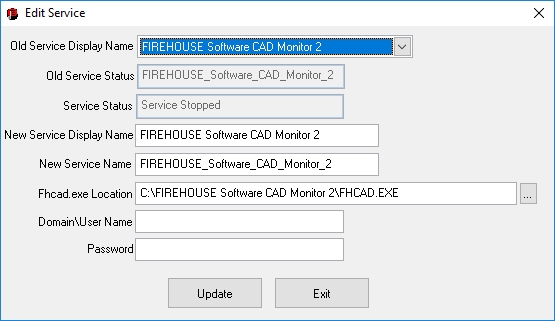
The Edit Service dialog box appears.
- From Old Service Display Name, select the name of the service you want to edit.
- In New Service Display Name, New Service Name, and Fhcad.exe Location, edit the values as needed.
- In Domain\User Name, type the domain name and user name of the user whose login runs the service.
- In Password, type the password for the user whose login runs the service.
-
Click Update.
The "update" process actually deletes the service you selected and then replaces it with a new one. The Delete Service confirmation dialog box appears.
-
Click OK.
The Create Service confirmation dialog box appears.
- Click OK.
- In the Edit Service dialog box, click Exit.