EDDT
To the right of the Heads-Up Display (HUD) is the EDDT, a multiple-function status window that reports various pieces of information, depending on what action you are currently performing.

N/A is the default report for the EDDT when the program is initially launched and no sketch is loaded.

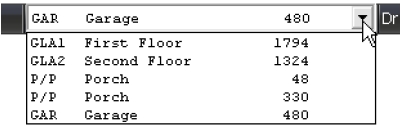
Area Status & Calculations appears as you draw, and in a couple of ways. If you currently have an open area, this area appears and says Open to the right. When the area is closed, the calculation for that area appears to the right.

If you have multiple areas drawn and would like to view the calculations through the EDDT, click the menu, and view the list that appears..
Drawing Mode appears in the EDDT whenever you are in draw-first or free-form mode.

Font & Point Size of the selected text label or dimension appears in the EDDT when you select text label, giving you a quick reference when making adjustments to text and/or dimensions.
