License activation and registration
To use FH Sketch within Firehouse, you must have an installation of FH 7 and an activation license. FH Sketch files install with FH, and are available as soon as you activate FH. The activation activates it on all computers.
- Login to FH with administrative rights.
-
Choose Administration → Activate or Update Features → Online System Activation.
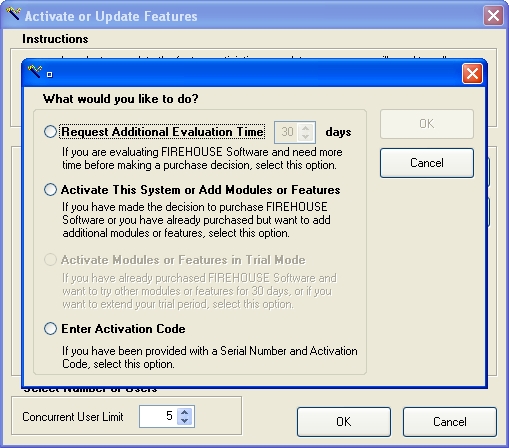
The Activate or Update Features dialog box appears, with an additional dialog box over it.
-
Select Enter Activation Code, and then click OK.
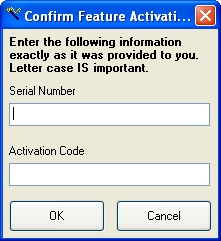
The Confirm Feature Activation dialog box appears over the Activate or Update Features dialog box.
- In Serial Number and Activation Code, enter the serial number and code listed in the top of the license activation code document you were sent when you purchased FH Sketch.
-
Click OK.
A confirmation dialog box appears, and other prompts may appear.
- Respond to any prompts that appear.